• User Documentation 
  • Amaryllis Release Notes 
  • For Developers 

  • User Documentation 
  • Amaryllis Release Notes 
  • For Developers 

User Guide

  • folder icon closed folder iconGetting Started
    • Logging In for the First Time
    • System Hierarchy
    • Hierarchy Usage and Summary View
    • Understand Fee and Commission
    • Understanding Reports
    • Making Configuration Easier
  • folder icon closed folder iconSystem Administration
    • Putting It All Together
    • System Setup Flow
    • Platform Account Administration
    • Platform Account Configuration
    • Service Provider Administration
    • Service Provider Configuration
    • Operator and Service Provider Branding Settings
    • Sub-Account Administration
    • Sub-Account Configuration
  • folder icon closed folder iconUser Administration
    • System Users and Functionality
    • Back Office User Administration
    • API User Administration
    • Agent Administration
    • Agent Configuration
  • folder icon closed folder iconReporting
    • Report Menu
    • Account Balance
    • Payouts
    • Payouts Reconciliation
    • Settlements
    • Approval Rate
    • Transaction Summary
    • Transactions
    • Fees Summary
    • Incoming Fees
    • Expected Future Revenue
    • Profitability Analysis Report
    • Reconciliation Summary
    • Reconciliation Records
    • Chargeback Analysis
    • Tokens Report
    • Merchant Statement
    • Management Level Reports (Operator, Service Provider, Agent, Platform)
  • folder icon closed folder iconAlerts Center
    • Rules Management
    • Alerts Management
    • Active Alerts
    • Resolved Alerts
  • folder icon closed folder iconUnderwriting Management
    • Underwriting Templates
    • Underwriting Template Configuration
    • Underwriting Application
    • Underwriting Application Configuration
    • Managing Underwriting Application
    • Sign-Up Summary
  • folder icon closed folder iconDisputes Management
    • Active Disputes
    • Resolved Disputes
  • folder icon closed folder iconTransactions Processing
    • Transaction Types
    • Import Mode
    • Echo Mode
  • folder icon closed folder iconDashboards
    • Financials
    • Management
  1. Home
  2. Docs
  3. User Guide
  4. User Administration
  5. API User Administration
Updated on January 26, 2023

User Guide

  • folder icon closed folder iconGetting Started
    • Logging In for the First Time
    • System Hierarchy
    • Hierarchy Usage and Summary View
    • Understand Fee and Commission
    • Understanding Reports
    • Making Configuration Easier
  • folder icon closed folder iconSystem Administration
    • Putting It All Together
    • System Setup Flow
    • Platform Account Administration
    • Platform Account Configuration
    • Service Provider Administration
    • Service Provider Configuration
    • Operator and Service Provider Branding Settings
    • Sub-Account Administration
    • Sub-Account Configuration
  • folder icon closed folder iconUser Administration
    • System Users and Functionality
    • Back Office User Administration
    • API User Administration
    • Agent Administration
    • Agent Configuration
  • folder icon closed folder iconReporting
    • Report Menu
    • Account Balance
    • Payouts
    • Payouts Reconciliation
    • Settlements
    • Approval Rate
    • Transaction Summary
    • Transactions
    • Fees Summary
    • Incoming Fees
    • Expected Future Revenue
    • Profitability Analysis Report
    • Reconciliation Summary
    • Reconciliation Records
    • Chargeback Analysis
    • Tokens Report
    • Merchant Statement
    • Management Level Reports (Operator, Service Provider, Agent, Platform)
  • folder icon closed folder iconAlerts Center
    • Rules Management
    • Alerts Management
    • Active Alerts
    • Resolved Alerts
  • folder icon closed folder iconUnderwriting Management
    • Underwriting Templates
    • Underwriting Template Configuration
    • Underwriting Application
    • Underwriting Application Configuration
    • Managing Underwriting Application
    • Sign-Up Summary
  • folder icon closed folder iconDisputes Management
    • Active Disputes
    • Resolved Disputes
  • folder icon closed folder iconTransactions Processing
    • Transaction Types
    • Import Mode
    • Echo Mode
  • folder icon closed folder iconDashboards
    • Financials
    • Management

API User Administration

Operator Manager and Service Provider Admin can Preview, Add and/or Edit API Users in the Back-Office API Users section.

API Users access the System functionality via the System API based on the specific API User Role permissions level. API Users do not have access to the Back-Office

API User Roles Available

NameDescription
Processing And ReportsAPI User gets access to transactions processing and reports
Service Provider ManagementAPI User permissions correspond to the ones of a Service Provider Admin
Platform(s) ManagementAPI User permissions correspond to the ones of a Platform Admin

API User Creating/Editing

  • Go to the API Users section under the Service Providers Management tab
  • Click ‘Add API User’ or select an API User and click ‘Add/Edit API User’ in the Actions pop-up options list
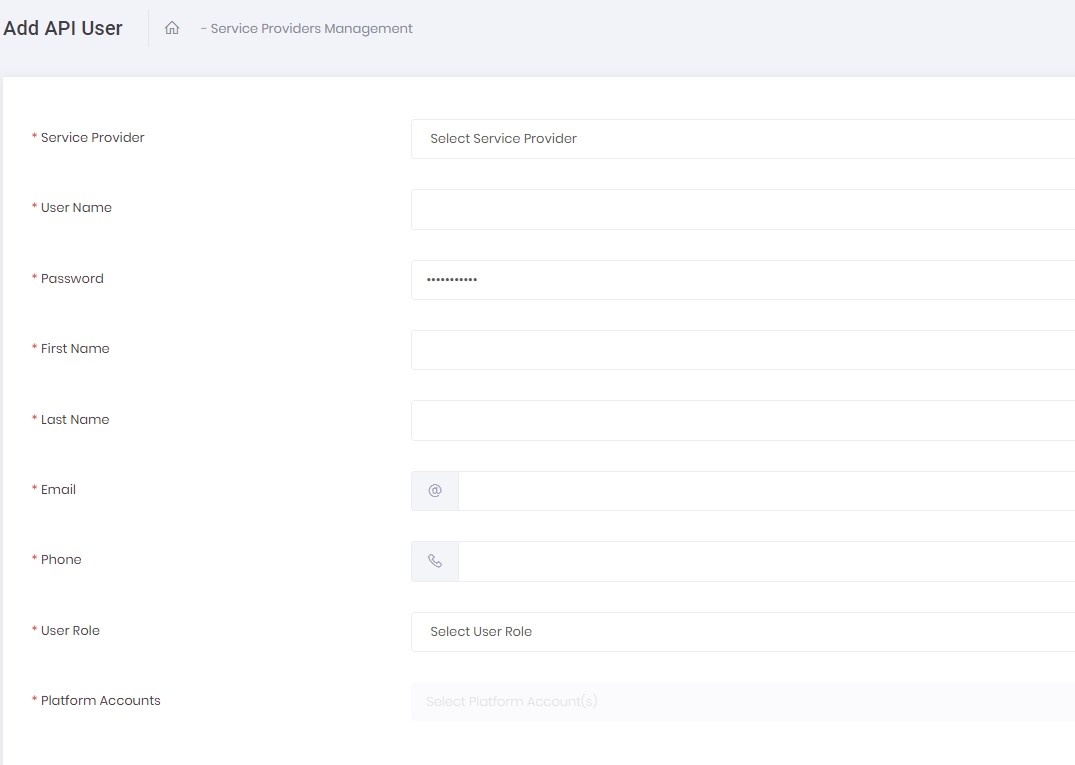
  • Fill-in the Add/Edit API User form
  • Click Save to submit a new API User or Cancel to return to the list of existing API Users

Add/Edit API User Form Details

  •  
NameDescription
Service ProviderSelect Service Provider to which your API User will be subordinate
User NameEnter User Name of your API User
PasswordPassword is generated automatically. You can manually edit it
First NameEnter your user First Name
Last NameEnter your user Last Name
E-mailThis email address is used for confirmation and updates of the User Password
PhoneEnter your user contact phone number
User RoleSelect one of the available User Roles for your API User
Platform AccountsYou can make more than one selection from the list of available Platform Accounts your API User will get access to select All to give your API user access to all available Platform Accounts and Sub-Accounts based on Service Provider

API User Disabling/Enabling

  • Select at least one API User in the list of API Users   
  • Click Actions and select ‘Disable/Enable API User’
  • You can also Disable/Enable API User via context menu by selecting the appropriate option
  • Select ‘Yes, disable it!’ to disable or ‘Yes, enable it!’ to enable an API User in the pop-up dialog window
  • The API User Status changes to Disabled or Active accordingly


API User Deleting

  • Select at least one API User   
  • Click Actions and select ‘Delete API User’
  • Click ‘Yes, delete it!’ in the pop-up dialog window to delete an API User
  • You can also delete API User by clicking Actions in the last column of the table and selecting the appropriate option
Still stuck? How can we help?
Was this page helpful? Yes No

How can we help?

© Amaryllis Payment Solutions, 2022  All rights reserved.