• User Documentation 
  • Amaryllis Release Notes 
  • For Developers 

  • User Documentation 
  • Amaryllis Release Notes 
  • For Developers 

Release Notes

  • folder icon closed folder iconRelease 3.3.12
    • Brim Embedded Finance
    • New Transaction Types: Sale Reject and Credit Reject
    • Merchant Statement Enhancements
    • Fee configuration enhancements
    • Reports Enhancements
    • Dedicated Entry Modes for Fee Configuration
    • Integration with Adyen
    • UMS Enhancements
  • folder icon closed folder iconRelease 3.3.11
    • Tokenization iFrame Enhancements
    • Sub-account Status Model Enhancement
    • UMS Enhancements
    • New Parameters Added to Transaction Processing and Echo
    • GIACT Fraud Service Validation Result Reuse
    • Updates to Fee Configuration
    • Reports Enhancements
    • Merchant Statement Enhancements
    • New Currencies Support
    • Transaction Processing via TSYS TransIT
    • Support for Fiserv Interchange and Card Brand Fees
    • Support for TSYS Canada Interac Fees
    • Embedded Payments: Liberis
  • folder icon closed folder iconRelease 3.3.10
    • UMS Enhancements
    • Interchange Fees Enhancements
    • Reports Enhancements
    • New: Per-Transaction Amount Limits
    • System Enhancements
  • folder icon closed folder iconRelease 3.3.9
    • Email Two-Factor Authentication
    • UMS Enhancements
    • System Enhancements
  • folder icon closed folder iconRelease 3.3.8
    • UMS Enhancements
    • Payouts Enhancements
    • Reports Enhancements
    • Alerts Center Enhancements
    • Stripe Integration: Dispute Management
    • GIACT Fraud Service for ACH Transactions
    • Gateway Updates
  • folder icon closed folder iconRelease 3.3.7
    • UMS Enhancements
    • Reports Enhancements
    • New API User roles
    • Alerts Center Enhancements
    • System Enhancements
    • Integration with Stripe
  • folder icon closed folder iconRelease 3.3.6
    • Code of Conduct
    • UMS Enhancements
    • Alert Center Enhancements
    • Support Agent Id in Billing Override
    • Sub-Accounts status “Funds Hold”
    • Payouts Reject Management
    • Recurring Billing
    • Adding Get Collection methods to Management API
    • Notifications Management
    • System enhancements
  • folder icon closed folder iconRelease 3.3.5
    • UMS external validation: TransUnion USA new configuration
    • UMS external validation: Integration with TransUnion Canada
    • New UMS Application status
    • New Action for UMS External Validation
    • UMS Application Filter
    • UMS Application Addresses auto-filling
    • Auto-Approval UMS Application
    • UMS Application export JSON
    • UMS Webhook
    • Integration with Fiserv
    • System enhancements
    • Transaction type selection for Pricing Tier Fee
    • Reports Aggregated View enhancements
    • Alerts Center improvements
    • Reports improvements. Revenue columns
  • folder icon closed folder iconRelease 3.3.4
    • UMS Enhancements
      • Onboarding to NMI Gateway
      • Enhanced LexisNexis validation results
      • Added UMS Notifications settings
    • Feature Enhancements
      • Implemented Reports Aggregated View
      • Entities Reports API
      • Configuration of Quantity for Scheduled Fees
      • Conditional Scheduled Fees
      • Support for 2-step approval for negative payouts
      • BPC CC processing Integration
      • Added Internal Merchant Statement
      • Agent Access enhancements
  • folder icon closed folder iconRelease 3.3.3
    • UMS Enhancements
      • GIACT
      • Lexis Nexis
      • Adding “POS / Terminal Details” section to Applications preview details
      • Additional fields to Templates and Applications
    • Feature Enhancements
      • Support for Operator Managers with selected Service Providers
      • Adding BuyRate and Split capabilities to Scheduled fees
      • Pricing Tier Fee (formerly known as Scale Range Fees) Enhancements
      • Multiple Payout Banks
      • Reports aggregated view
  • folder icon closed folder iconRelease 3.3.2
    • Financial Dashboard and Management Dashboard Renewed
      • Financial Dashboard
      • Management Dashboard
      • Operators and Service Providers wizard Enhancements
    • Chargeback Analysis report Enhancements
    • Alert Center Enhancements
    • Underwriting Management Improvements
      • Application Re-Validation
      • New API endpoint for Application files management
    • Integrations – Merchant Warrior Improvements
  • folder icon closed folder iconRelease 3.3.1
    • Chargeback Reason Description for Transactions Report
    • External Fee Ids
    • Seasonal Fee Enhancement – Relative Date
    • Partner Self-Management – Billing/Pricing Optimization
    • New API Endpoints: Get Validation Result and Get Onboarding Details
    • PDF Application Export for merchants boarded to TSYS 
    • New API/BO Role with Limited Permissions for Underwriting Management 
    • Automatic Creation of Sub-Account
    • New API Endpoint: Get Pricing Details
    • UMS Enhancements
    • Integration with Checkout
    • Enhancements for TSYS Onboarding Process
  • folder icon closed folder iconRelease 3.2.16
    • New Payment Type Filter for Reports
    • Report Improvements for Merchant View
    • New API Endpoint: Get Resubmission
    • Actions at Entities and Banks Validation by External Services
  • folder icon closed folder iconRelease 3.2.15
    • Underwriting Management
    • System administration
    • Transactions processing
    • Reports
    • Processing gateway improvements
    • New CFSB Payout Processor
  • folder icon closed folder iconRelease 3.2.14
    • UMS. Internal Notes & Documents for an Application
    • TransUnion External Validation Service Integration
    • HYP Processing
    • Merchant Warrior Improvements
    • Processing Gateway Improvements
  • folder icon closed folder iconRelease 3.2.13
    • Back-Office customization
    • Branding preview to Operator and Service Provider
    • Fee Summary report enhancement
    • Fee on Fee for Agents
    • UMS Enhancement
    • NMI Processing
    • API user permission changes
  • folder icon closed folder iconRelease 3.2.12
    • Backoffice Users Self-Edit
    • Back-Office Page Customization
    • Buyrate Enhancements
    • UMS: Multiple owners and contacts
    • Multi-Factor Authentication (MFA)
    • Reports Scheduler enhancements
    • Duplicate MID Check
    • Reports API Enhancement
    • Payout Details Self-Edit
  • folder icon closed folder iconRelease 3.2.11
    • UMS 2.0
    • UMS Improvements
    • UMS Application Resubmit
    • Underwriting and Onboarding Analytics
    • Dispute Management
    • Back-Office Branding Enhancements
    • Payouts Reconciliation Report
    • Profitability Analysis report for Sub-Accounts
    • CIBC Canada
    • CIBC US Implementation
    • Sub-Account Creation Template Modifications
    • Disable Scheduled Payouts
    • New JSON endpoint for processing transactions
  1. Home
  2. Docs
  3. Release Notes
  4. Release 3.2.15
  5. Underwriting Management
Updated on October 25, 2022

Release Notes

  • folder icon closed folder iconRelease 3.3.12
    • Brim Embedded Finance
    • New Transaction Types: Sale Reject and Credit Reject
    • Merchant Statement Enhancements
    • Fee configuration enhancements
    • Reports Enhancements
    • Dedicated Entry Modes for Fee Configuration
    • Integration with Adyen
    • UMS Enhancements
  • folder icon closed folder iconRelease 3.3.11
    • Tokenization iFrame Enhancements
    • Sub-account Status Model Enhancement
    • UMS Enhancements
    • New Parameters Added to Transaction Processing and Echo
    • GIACT Fraud Service Validation Result Reuse
    • Updates to Fee Configuration
    • Reports Enhancements
    • Merchant Statement Enhancements
    • New Currencies Support
    • Transaction Processing via TSYS TransIT
    • Support for Fiserv Interchange and Card Brand Fees
    • Support for TSYS Canada Interac Fees
    • Embedded Payments: Liberis
  • folder icon closed folder iconRelease 3.3.10
    • UMS Enhancements
    • Interchange Fees Enhancements
    • Reports Enhancements
    • New: Per-Transaction Amount Limits
    • System Enhancements
  • folder icon closed folder iconRelease 3.3.9
    • Email Two-Factor Authentication
    • UMS Enhancements
    • System Enhancements
  • folder icon closed folder iconRelease 3.3.8
    • UMS Enhancements
    • Payouts Enhancements
    • Reports Enhancements
    • Alerts Center Enhancements
    • Stripe Integration: Dispute Management
    • GIACT Fraud Service for ACH Transactions
    • Gateway Updates
  • folder icon closed folder iconRelease 3.3.7
    • UMS Enhancements
    • Reports Enhancements
    • New API User roles
    • Alerts Center Enhancements
    • System Enhancements
    • Integration with Stripe
  • folder icon closed folder iconRelease 3.3.6
    • Code of Conduct
    • UMS Enhancements
    • Alert Center Enhancements
    • Support Agent Id in Billing Override
    • Sub-Accounts status “Funds Hold”
    • Payouts Reject Management
    • Recurring Billing
    • Adding Get Collection methods to Management API
    • Notifications Management
    • System enhancements
  • folder icon closed folder iconRelease 3.3.5
    • UMS external validation: TransUnion USA new configuration
    • UMS external validation: Integration with TransUnion Canada
    • New UMS Application status
    • New Action for UMS External Validation
    • UMS Application Filter
    • UMS Application Addresses auto-filling
    • Auto-Approval UMS Application
    • UMS Application export JSON
    • UMS Webhook
    • Integration with Fiserv
    • System enhancements
    • Transaction type selection for Pricing Tier Fee
    • Reports Aggregated View enhancements
    • Alerts Center improvements
    • Reports improvements. Revenue columns
  • folder icon closed folder iconRelease 3.3.4
    • UMS Enhancements
      • Onboarding to NMI Gateway
      • Enhanced LexisNexis validation results
      • Added UMS Notifications settings
    • Feature Enhancements
      • Implemented Reports Aggregated View
      • Entities Reports API
      • Configuration of Quantity for Scheduled Fees
      • Conditional Scheduled Fees
      • Support for 2-step approval for negative payouts
      • BPC CC processing Integration
      • Added Internal Merchant Statement
      • Agent Access enhancements
  • folder icon closed folder iconRelease 3.3.3
    • UMS Enhancements
      • GIACT
      • Lexis Nexis
      • Adding “POS / Terminal Details” section to Applications preview details
      • Additional fields to Templates and Applications
    • Feature Enhancements
      • Support for Operator Managers with selected Service Providers
      • Adding BuyRate and Split capabilities to Scheduled fees
      • Pricing Tier Fee (formerly known as Scale Range Fees) Enhancements
      • Multiple Payout Banks
      • Reports aggregated view
  • folder icon closed folder iconRelease 3.3.2
    • Financial Dashboard and Management Dashboard Renewed
      • Financial Dashboard
      • Management Dashboard
      • Operators and Service Providers wizard Enhancements
    • Chargeback Analysis report Enhancements
    • Alert Center Enhancements
    • Underwriting Management Improvements
      • Application Re-Validation
      • New API endpoint for Application files management
    • Integrations – Merchant Warrior Improvements
  • folder icon closed folder iconRelease 3.3.1
    • Chargeback Reason Description for Transactions Report
    • External Fee Ids
    • Seasonal Fee Enhancement – Relative Date
    • Partner Self-Management – Billing/Pricing Optimization
    • New API Endpoints: Get Validation Result and Get Onboarding Details
    • PDF Application Export for merchants boarded to TSYS 
    • New API/BO Role with Limited Permissions for Underwriting Management 
    • Automatic Creation of Sub-Account
    • New API Endpoint: Get Pricing Details
    • UMS Enhancements
    • Integration with Checkout
    • Enhancements for TSYS Onboarding Process
  • folder icon closed folder iconRelease 3.2.16
    • New Payment Type Filter for Reports
    • Report Improvements for Merchant View
    • New API Endpoint: Get Resubmission
    • Actions at Entities and Banks Validation by External Services
  • folder icon closed folder iconRelease 3.2.15
    • Underwriting Management
    • System administration
    • Transactions processing
    • Reports
    • Processing gateway improvements
    • New CFSB Payout Processor
  • folder icon closed folder iconRelease 3.2.14
    • UMS. Internal Notes & Documents for an Application
    • TransUnion External Validation Service Integration
    • HYP Processing
    • Merchant Warrior Improvements
    • Processing Gateway Improvements
  • folder icon closed folder iconRelease 3.2.13
    • Back-Office customization
    • Branding preview to Operator and Service Provider
    • Fee Summary report enhancement
    • Fee on Fee for Agents
    • UMS Enhancement
    • NMI Processing
    • API user permission changes
  • folder icon closed folder iconRelease 3.2.12
    • Backoffice Users Self-Edit
    • Back-Office Page Customization
    • Buyrate Enhancements
    • UMS: Multiple owners and contacts
    • Multi-Factor Authentication (MFA)
    • Reports Scheduler enhancements
    • Duplicate MID Check
    • Reports API Enhancement
    • Payout Details Self-Edit
  • folder icon closed folder iconRelease 3.2.11
    • UMS 2.0
    • UMS Improvements
    • UMS Application Resubmit
    • Underwriting and Onboarding Analytics
    • Dispute Management
    • Back-Office Branding Enhancements
    • Payouts Reconciliation Report
    • Profitability Analysis report for Sub-Accounts
    • CIBC Canada
    • CIBC US Implementation
    • Sub-Account Creation Template Modifications
    • Disable Scheduled Payouts
    • New JSON endpoint for processing transactions

Underwriting Management

Notes for declined fields in an Application

Now Users can add notes to the declined fields in the Business Details, Contact Details, Risk Profile, and Risk Assessment sections of the Application preview grid. Enabling to leave comments about the reason for declining a parameter or requirement for the declined field.
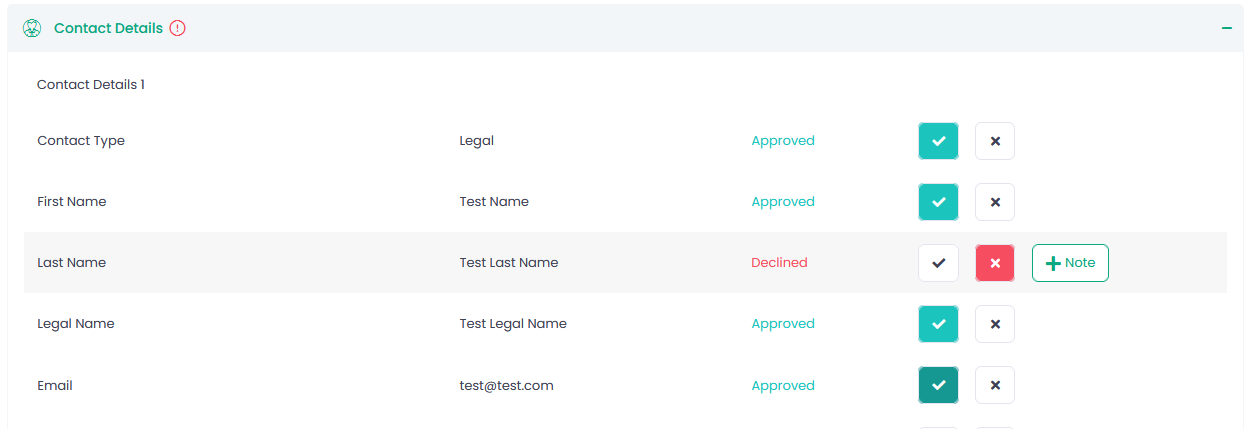
If any field in a section, a red exclamation-circle icon is displayed next to the title of this section.

Please note that this exclamation-circle icon will be seen next to the External Validation Services section and a particular validation service in the following cases as well:

  • Validation services have declined validation results
  • There is at least one check in the grid with status = Failure (for TinCheck and Mastercard Match)
  • If bank account validation and/or owner validation status = Failure (for Plaid)
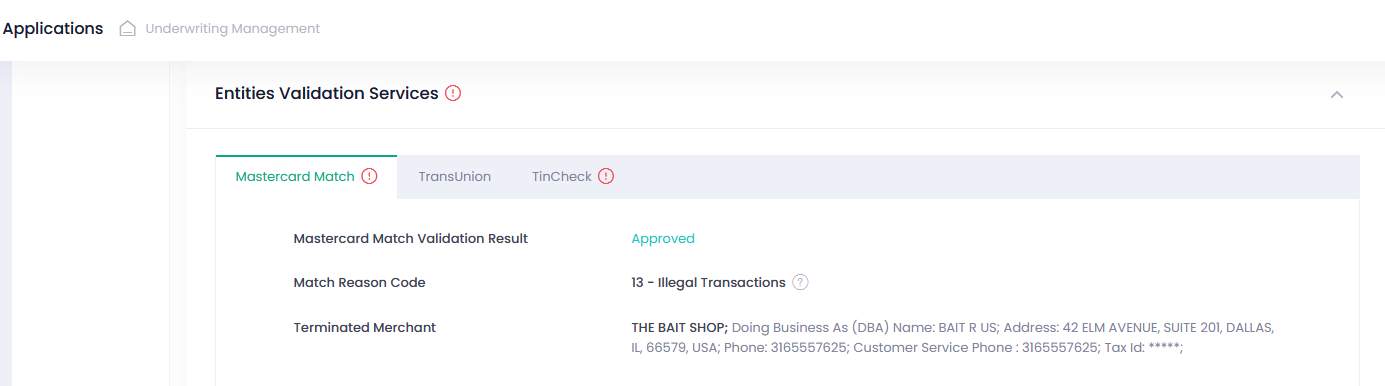
These notes can be edited or deleted as required.
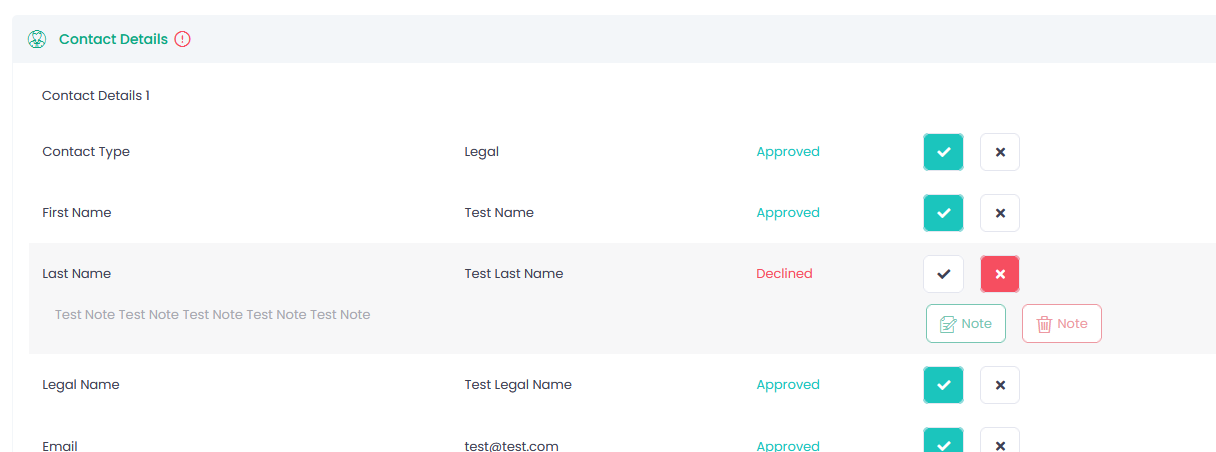
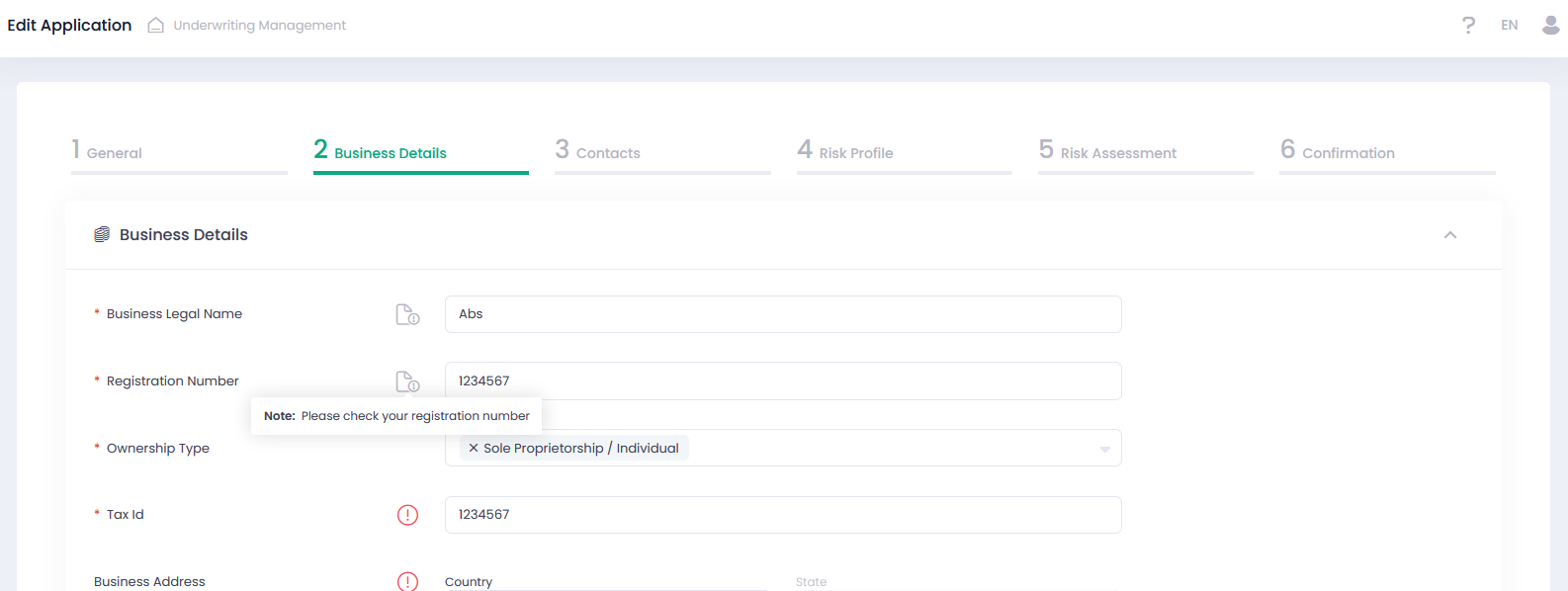
Moreover, these notes can be seen while editing an Application or on the Iframe resubmission page as well.


If there is no note for a declined field in the edit mode, an exclamation-circle icon is displayed next to it.
Improvements for External Entities Validation

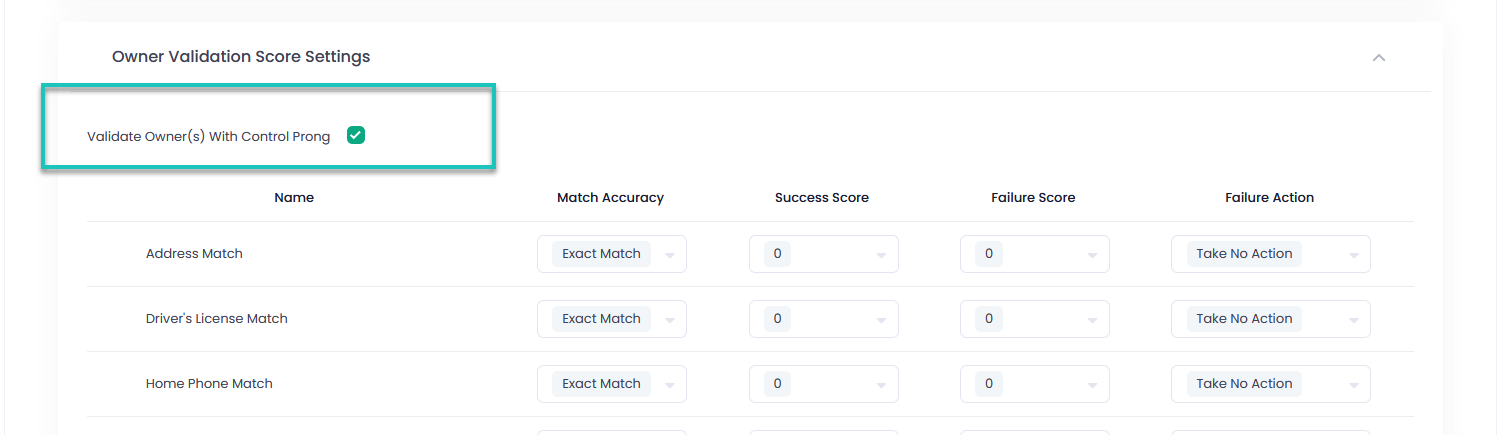
If you want to validate the owners with control prong only, you can mark the box ‘Validate Owner(s) with Control Prong’ in the owner validation score settings of your template. Otherwise, the system will validate all owners.
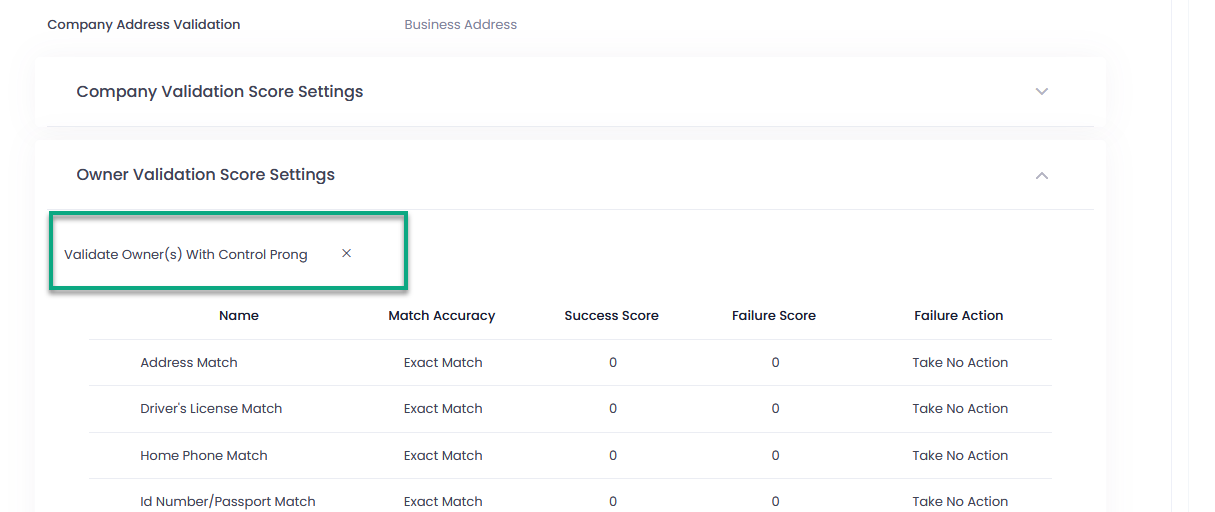
Data on validation of the owners with control prong is highlighted in the Application Preview Details as well.
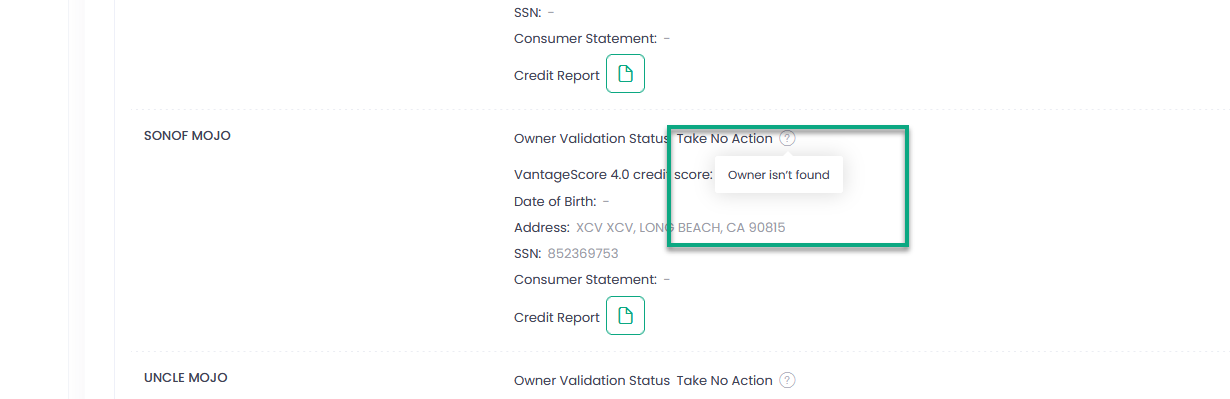
If an owner was not found for validation in the TransUnion’s databases, a corresponding message will be displayed while hovering over the icon next to that owner in the Preview Details of an Application.
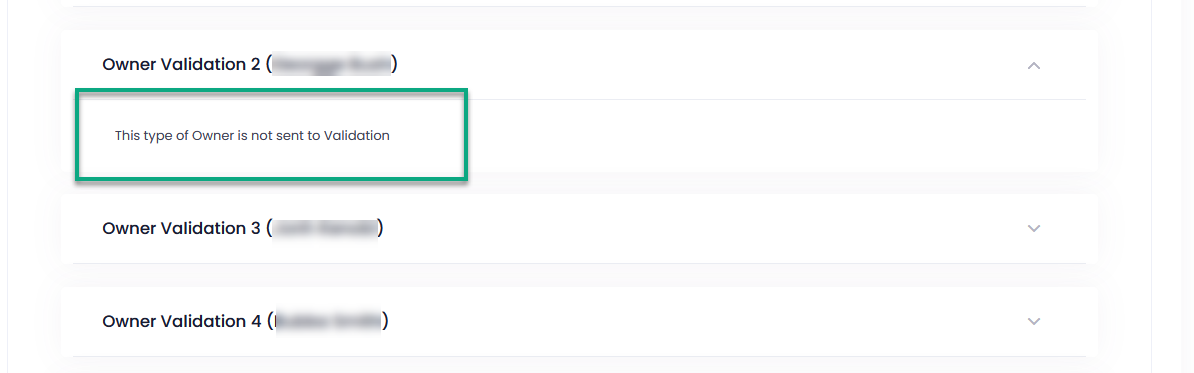
For TinCheck, such a message is displayed in the expand section for this owner instead of the detailed information if validation has not been performed.
In addition, we have added to the Owner Validation the names of the owners in brackets to clarify who is validated.
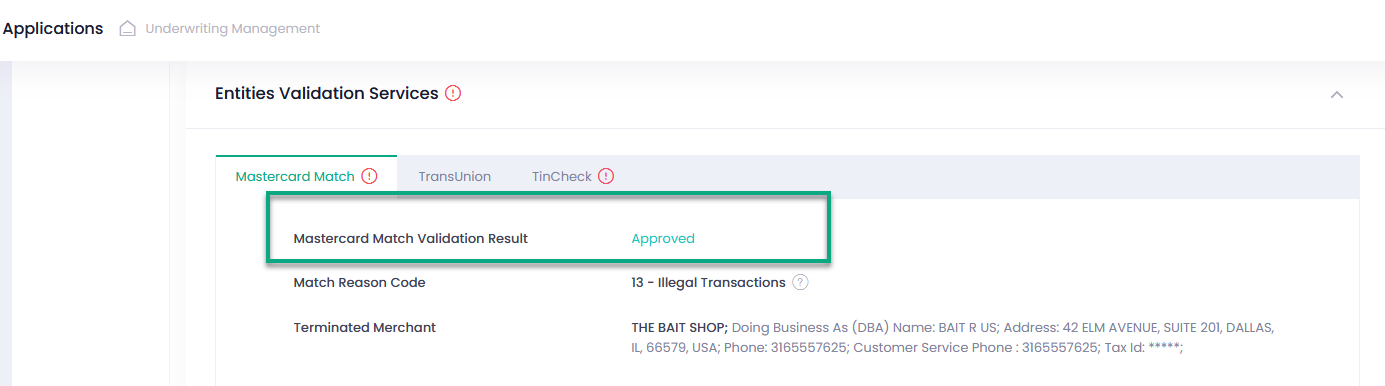
We have also added the results of validation by external validation services to the Application Preview Details.
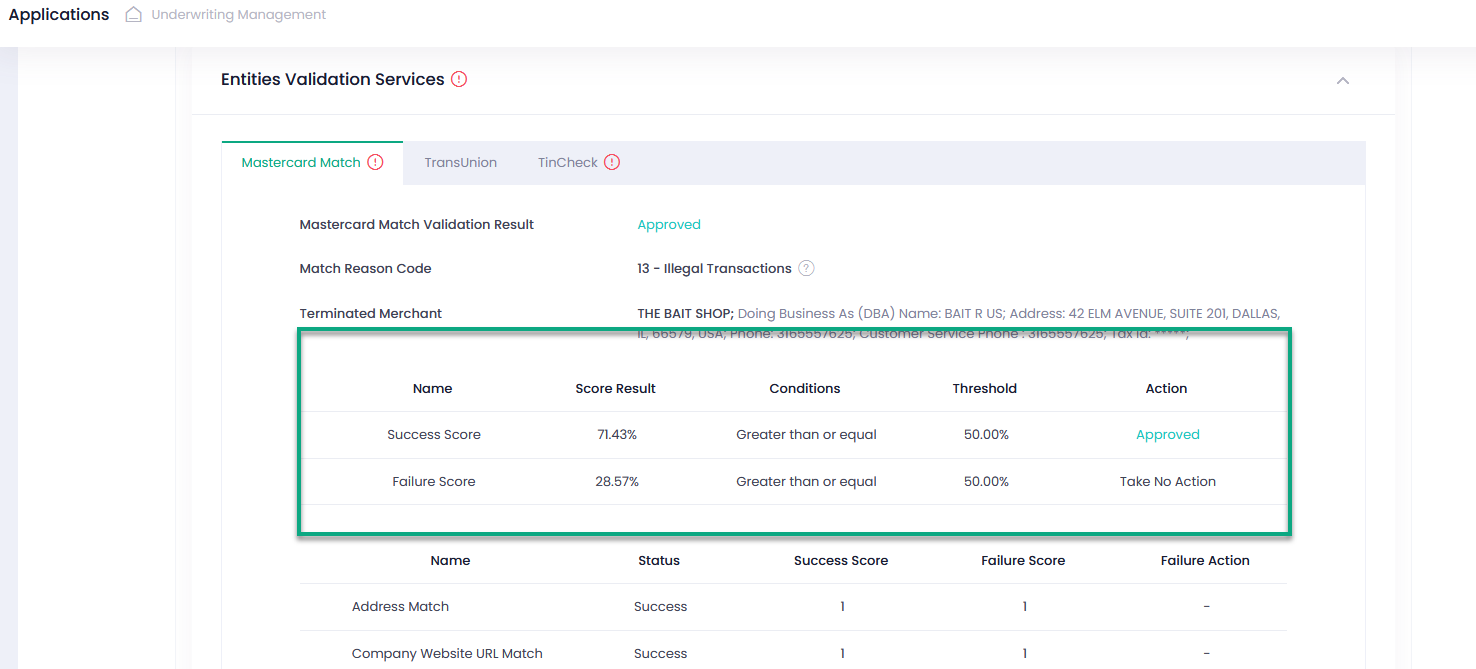
Furthermore, you can see the validation scores received from the external validation services.
Still stuck? How can we help?
Was this page helpful? Yes No

How can we help?

© Amaryllis Payment Solutions, 2022  All rights reserved.