UMS Enhancements
Limit Users by UMS Template Id
Back-Office users can create and edit Underwriting Templates and Applications, based on their user Template permissions that are configurable per user. To support this, a new field “Underwriting Template(s)” has been added to the relevant user creation screens, including the Back-Office User, Agent, and Operator setup wizards. 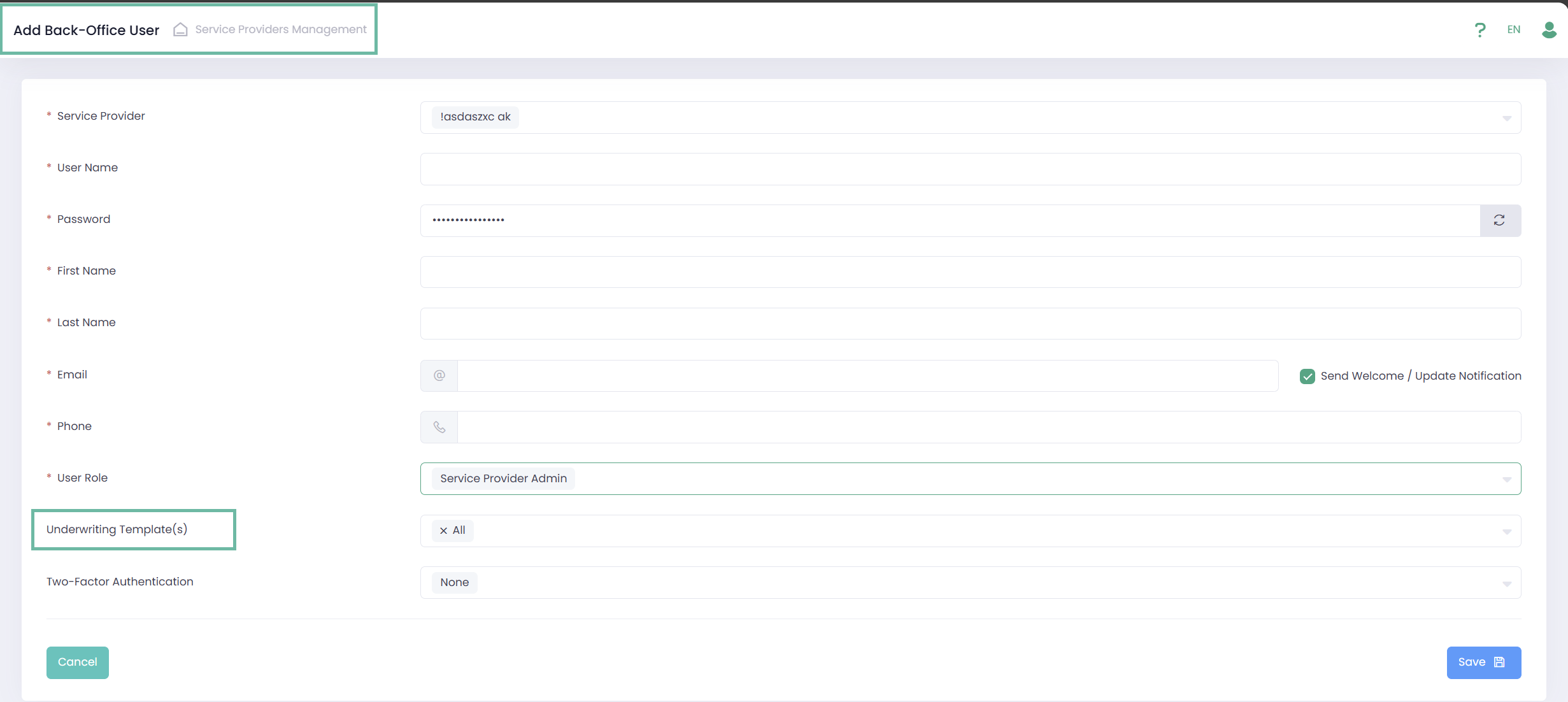
BackOffice User:
- Hidden by default until Service Provider and User Role have been selected.
- Displayed only for User Roles: Platform Admin, Service Provider Admin, Underwriting Management, and other custom roles based on them.
API User and Agent:
- Hidden by default until Service Provider and Agent Role have been selected.
- Displayed for User Roles = All.
Operator Manager:
- Hidden by default until Operator and User Role have been selected.
- Displayed for User Roles = All.
Current users have already been updated with the additional field in case relevant.
Sign-Up Summary report, Management Dashboard changes
Sign-Up Summary report and Management Dashboards now only displays Applications count based on Templates allowed for the user.
Management API changes
The new parameters, addAllUnderwritingTemplates and underwritingTemplates, have been added to the Users Management API (GET/POST/PUT User models) to define which UMS Template(s) a new User with any userRole (except PlatformUser) can manage.
For current users that already manage UMS Templates, addAllUnderwritingTemplates is True. It means that they manage ALL UMS Template(s) under selected Service Providers.
For additional information, please refer to our Developer Portal.
New UMS API endpoints for Entities address
To enable validating Entities address and getting addresses by zip using the API, two new endpoints were developed:
GET Addresses. Method returns all available addresses for a given ZIP-code.
- In the request URL User should enters attribute {ZIPCode}. For the United States, this method supports only the 5-digit ZIP-code format (XXXXX). ZIP+4 format (XXXXX-XXXX) is not supported within this endpoint.
- In the response User receives a Json object containing the list of available addresses.
GET Address Validation. Method returns the result of ZIP-code validation relevant for a given country, city, state.
- In the request URL user should enter {ZIPCode}, {countryCode}, {cityName}, {stateCode}. The {countryCode} and {stateCode} parameters must be provided as a 2-letter ISO-3166 code.
- In the response User receives a Json object with the validation result. ZIP-code validation is currently supported only for the United States (US) and Canada (CA). For all other countries, the service returns “true“ by default.