Fee configuration enhancements
Billing Date Delay and Reserve Settings Override
Previously, Billing Date Delay and Reserve Settings (applicable to reserve fees only) could only be configured at the Service Provider level. It is now possible to override these values at a more granular level, providing greater flexibility in fee configuration and allowing each entity to have its own billing and reserve settings tailored to specific business needs.
- Billing Date Delay can be overridden for each specific fee in the Billing step of the Sub-Account (for sub-account fees), Agent (for agent fees), and Platform Account (for platform account fees) wizards.
- Reserve Settings (applicable to Reserve Fees only) can be overridden for Sub-Account fees only.
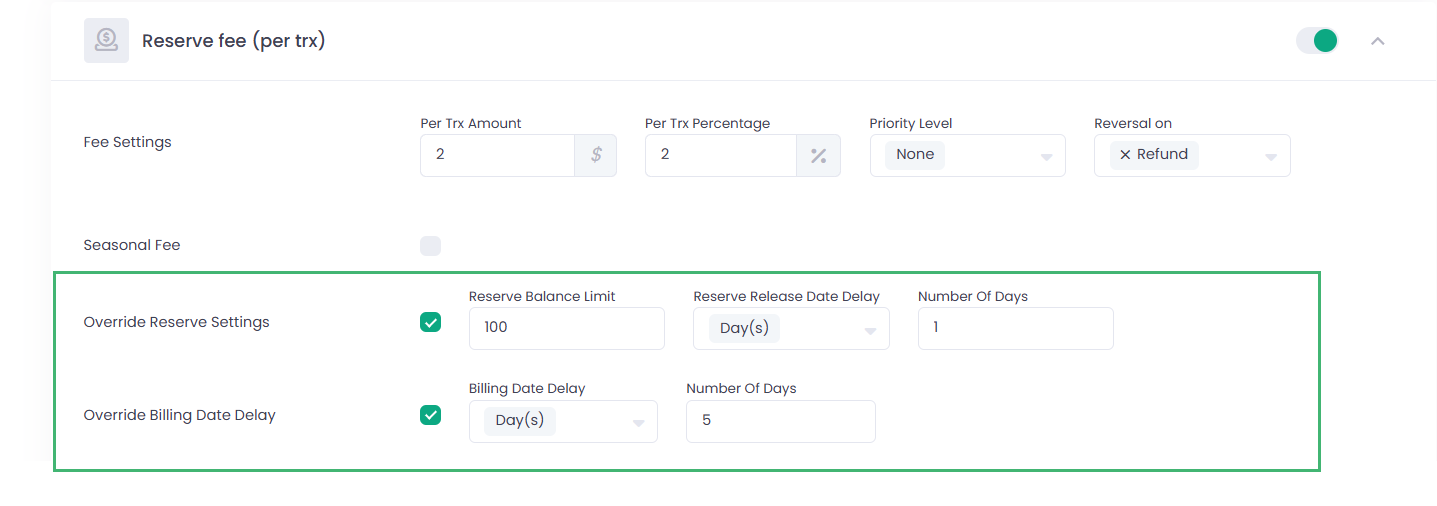
The following logic applies:
- If the settings are configured at the Sub-Account, Agent, or Platform Account level, those values will be used.
- If no override is configured at the entity level, the values defined at the Service Provider level will be applied.
The corresponding changes are reflected in the relevant APIs. For more details, please refer to our Developer Portal.
Billing Date Delay: New Supported Configuration
It is now possible to configure Billing Date Delay = 0 months in combination with Day Number = 31. With this configuration, all fees triggered during the current month will be settled on the last calendar day of that month.