Payouts Enhancements
Several updates have been made to enhance the payout configuration and processing functionality.
- Design updates
The design of the Payouts step has been updated for improved usability and clarity of the Payout configuration (see picture below in point 3). - Balance Payouts updates
- Payout type ‘Percentage’ has been renamed to ‘Balance Payout’.
- A new Amount Limit parameter has been added. If set, the payout amount will be calculated as the lower of two values: the specified percentage limit or the amount limit

- Interval Payouts added
A new payout type, ‘Interval Payout’, has been introduced. This payout type works similarly to the ‘Balance Payout’ in terms of payout scheduling and amount calculation but also allows you to set a future Payout Due Date, specifying when the payout will be released or processed. The ability to specify a future Payout Due Date will help minimize the risks associated with chargebacks, as well as control when payouts will be released or processed.
To configure the future Payout Due Date, specify the ‘Payout Due Time’ and ‘Payout will release after’ fields.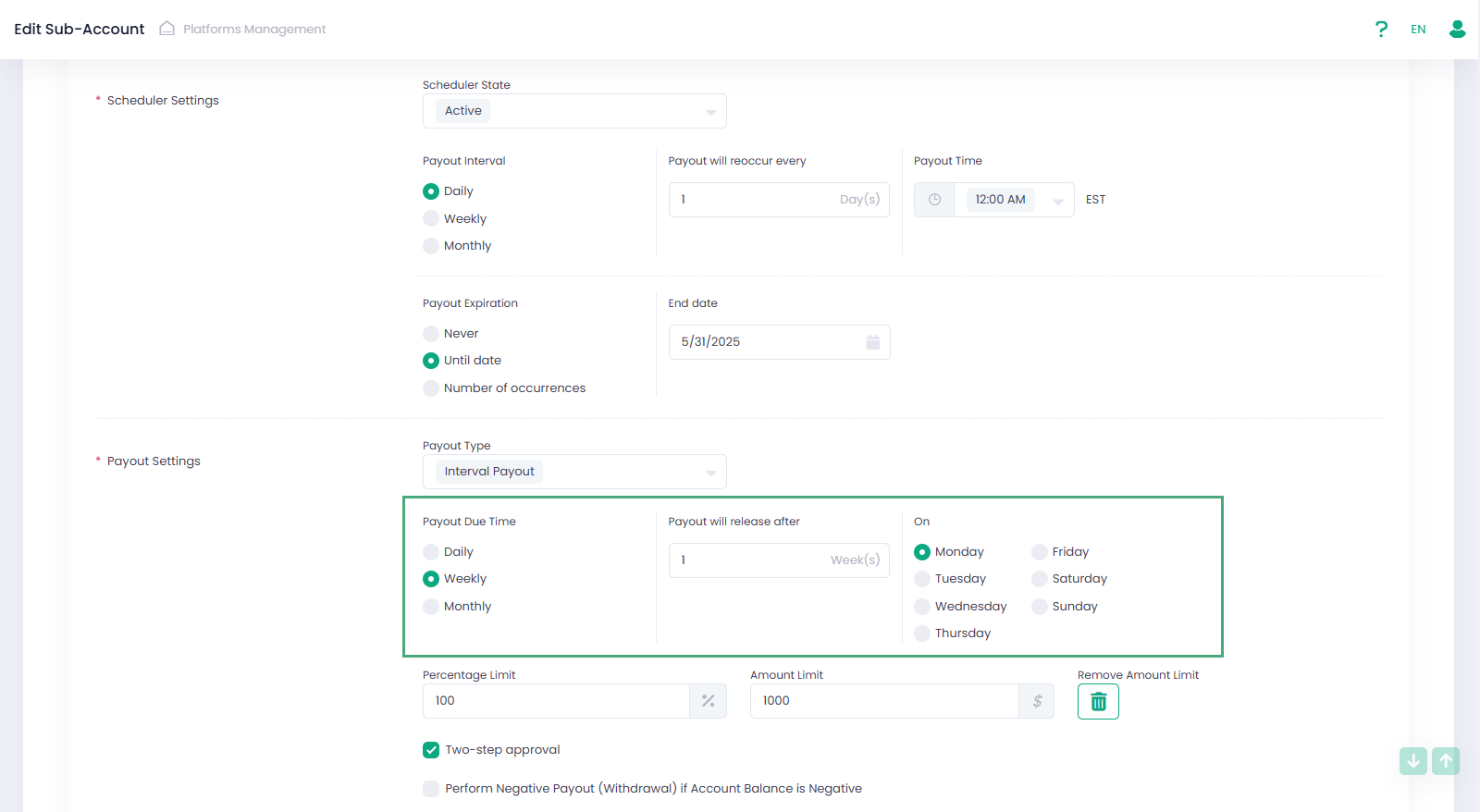
For example, a configuration as shown in the picture above means that the Payouts are scheduled daily (‘Scheduler Settings’ section, ‘Payout Interval’ is Daily), and all seven Payouts created during week#1 will be processed or released on Monday of week#2.
Interval Payout processing includes two main stages:- the System creates Payout in ‘Pending Due Date’ status and waits for the future Payout Due Date;
- at the Payout Due Date:
– if the ‘Two-Step approval’ flag is set to False, the System automatically processes the Payout;
– if the ‘Two-Step approval’ flag is set to True, the System only releases the Payout, changing its status to ‘Pending Approval’.
For the ‘Pending Due Date’ status, manual actions ‘Release & Approve’ and ‘Decline’ are also available before the Payout Due Date.
If for Negative Interval Payouts you also need to use logic with a future Payout Due Date, then additionally set the ‘Use Payout Due Time for Negative Payouts’ flag to true. This option is available only for monthly payouts (Payout Interval should be monthly).
- Past Interval Payouts removed
The ‘Past Interval’ payout type is no longer supported:- When configuring payouts, the option ‘Past Interval’ will no longer be available.
- All existing ‘Past Interval’ configurations will be automatically migrated to the new payout type ‘Interval Payout’.
- Past interval payouts that were processed previously will still be available for viewing in reports.
- Management API updates
Corresponding updates have been implemented in the Management API for the payouts.payouts.calculation object:- a new optional parameter, amountLimit, has been added.
- a new object, releaseConfiguration, has been introduced, allowing configuration of the Payout Due Date for Interval Payouts.
- the payoutType ‘Percentage’ has been renamed to BalancePayout and payoutType ‘PastInterval’ has been removed. As a result, the payoutType parameter now only supports the options BalancePayout and IntervalPayout.
- the intervalCount and intervalGap parameters have been removed.
For additional information please refer to our Developer Portal.