Reports Enhancements
New filters and fields in Transaction Report
It is now possible to view and filter the Transaction Report by four new parameters Transaction Initiator (merchant or customer), Initial Transaction (initial or subsequent), Processor ARN and Processor Settlement Date. The Processor ARN and Processor Settlement Date values will be displayed only for processors NMI and Payfacto.
Also, the MID filter has been removed from the Processor Details tab. However, you can still filter report by Sub-Account MID using the Select Sub-Account(s) filter.
Changes affect:
- Main grid of the Transaction Report and export files
- Transaction Details and Processor Details sections in the sub-grid of the Transaction Report
- Date Range, Transaction Details and Processor Details filter tabs
- Request and response parameters in the Transaction Report in the Reports API
New filters and fields in Reconciliation Records Report
The Reconciliation Report has been extended with two new fields:
- Processor ARN
- Processor Settlement Date
These fields are now available in the Back Office, the export version of the report and in the Reports API.
At this stage, the new fields are displayed only for NMI and Payfacto processors.
These enhancements provide greater transparency in transaction reconciliation for supported processors.
Account Balance Report Updates
Several improvements have been made to the Account Balance Report:
- The report is now generated for all sub-accounts, even if there was no account activity.
- The report now displays the Previous balance at the start of the selected time range (in the Account Balance section).
These enhancements provide a complete view of sub-account balances and allow to see the balance as of a specific date.
Summarized Export
A Summarized View has been introduced for the following reports:
- Fees Summary
- Incoming Fees
- Commissions and Fees
- Expected Future Revenue
- Payouts Reconciliation
This new view is based on the same data as the existing Itemized View (the current), but presents the data in a more high-level, aggregated format. Unlike Itemized View, which shows data per transaction or per fee depending on the report, Summarized View groups fees or transactions by predefined criteria, allowing users to get a higher-level overview. For example, in the Payout Reconciliation Report, the payout is now displayed as a single line. Instead of listing each transaction or fee separately, the report shows aggregated totals for sales, credits, chargebacks, reversals, fees, adjustments, releases, and other relevant categories.
Summarized View is available for Export and Reports API.
To export the report in the summarized view, click the Export button and select the Summarized option. 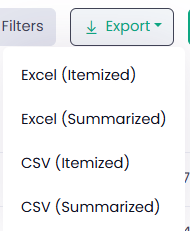
Note: “Itemized” refers to the current standard export view.
To retrieve the summarized view of the report via Reports API, use the new optional request parameter isSummarized.
- If isSummarized = true, Reports API will return the summarized report structure.
- If isSummarized = false (default value), Reports API will return the existing itemized structure.
The Summarized View supports multiple aggregation levels, providing flexibility to match different reporting needs.